About Hindi Voice Typing & Keyboard
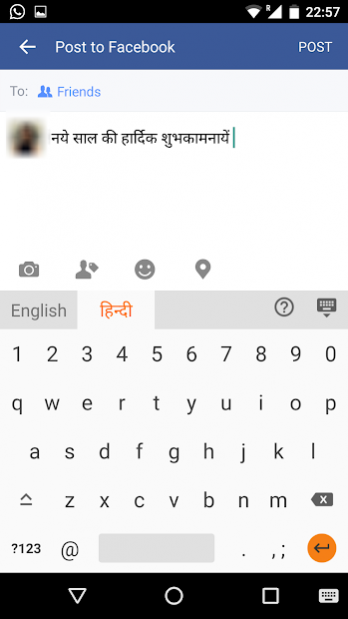
Send emails, post Facebook updates & send messages on Whatsapp in Hindi(हिन्दी) using Lipikaar Hindi Keyboard - an English to Hindi typing keyboard that works with all apps. 🎤 Hindi Voice
Send emails, post Facebook updates & send messages on Whatsapp in Hindi(हिन्दी) using Lipikaar Hindi Keyboard - an English to Hindi typing keyboard that works with all apps.
🎤
Hindi Voice Typing :
Use your voice to type in Hindi. Lipikaar Hindi Keyboard is one the most popular Hindi Voice Typing apps on the Google Play Store.
⌨️
Hindi Keyboard Typing :
✓ Simple and intuitive typing in Hindi using English keyboard. No memorizing key positions.
✓ No fluency in English is required. Lipikaar encourages users to think in their language.
✓ Easy switching between English and Hindi.
Made in India ❤️ Made for India ❤️
• Lipikaar Hindi typing method has been developed and patented by an ex-IITian. http://www.lipikaar.com/about-us
• Lipikaar Hindi Voice to Text typing is powered by gnani.ai - an Indian AI startup.
How to type in Hindi(हिन्दी) with Lipikaar :
Rule 1 : Repeatedly type the closest sounding key till you see the correct Hindi script character.
s = स ss = श sss = ष krr = क्र krrr = कृ
Rule 2 : Use "x" key to join two characters
pxr = प्र rxk = र्क kxy = क्य
Rule 3 : Use "z" key to add a special symbol of the script.
z = ं zz = ़ zzz = ँ zzzz = ः
For more details visit: http://www.lipikaar.com/hindi
Easy installation and setup :
• Download the app and open it.
• Step 1: Enable Lipikaar Hindi Keyboard.
• Step 2: Set it as your current keyboard.
• Step 3: Provide permissions to enable voice to text typing - Microphone, Storage, Display over other apps.
• That's all! You can now type in Hindi(हिन्दी) in any app using the keyboard or just your voice.
• Press the mic icon. Speak in Hindi and the app will do the typing for you.
• To switch keyboards easily, press and hold the space key.
We respect your privacy
We DO NOT collect any personal information (passwords, credit card details etc.) in any form, from any of our users. A standard warning is shown by Android for all third-party keyboards that you install.
Feedback
Please share your suggestions & feedback by emailing us at support@lipikaar.com
Previous Versions
Here you can find the changelog of Hindi Voice Typing & Keyboard since it was posted on our website on 2014-03-05 03:18:20.
The latest version is 8.1.8 and it was updated on 2026-10-10 09:25:47. See below the changes in each version.
Hindi Voice Typing & Keyboard version 8.1.8
Updated At: 2022-04-07
Changes: - Improvements and bug fixes.
- Rewarded Ads introduced.
- Monthly Subscription
Hindi Voice Typing & Keyboard version 8.1.5
Updated At: 2022-02-07
Changes: - Improvements and bug fixes.
- Pop-up ads removed.
Hindi Voice Typing & Keyboard version 8.1.1
Updated At: 2021-10-04
Changes: Bug fixes & IVT filtering
Hindi Voice Typing & Keyboard version 8.0.9
Updated At: 2021-04-19
Changes: Bug fixes and updates
Hindi Voice Typing & Keyboard version 8.0.7
Updated At: 2021-02-24
Changes: Bug fixes - Ads being shown to premium users intermittently.
Hindi Voice Typing & Keyboard version 8.0.5
Updated At: 2021-01-15
Changes: * Bug fixes.
Hindi Voice Typing & Keyboard version 8.0.4
Updated At: 2020-11-09
Changes: * Voice to Text now powered by Gnani.ai
* 15sec audio conversion limit removed
* Inline ads. No popups.
Hindi Voice Typing & Keyboard version 8.0.2
Updated At: 2020-10-19
Changes: * Added the 1234 number pad
* Long press on spacebar opens the keyboard switch option.
* Ability to turn word suggestions ON - OFF
* Vibrate on keypress disabled by default
Hindi Voice Typing & Keyboard version 8.0.2
Updated At: 2020-09-18
Changes: * Included permission for Draw over other apps - without this voice to text does not work on Xiaomi Phones
Hindi Voice Typing & Keyboard version 7.1.0
Updated At: 2020-08-03
Changes: * Set Lipikaar keyboard to default and the only keyboard available.
* Added Lipikaar Mapping Panel to guide new users
* Bug Fixes - Fixed issue related to voice typing printing the same text twice.
* Added the Numpad.
* Removed Gifskey integration.
* Included permission for Draw over other apps - without this voice to text does not work on Xiaomi Phones
Disclaimer
External Download
We do not host Hindi Voice Typing & Keyboard on our servers. We did not scan it for viruses, adware, spyware or other type of malware. This app is hosted by Galad and passed their terms and conditions to be listed there. We recommend caution when installing it.
The APK Download link for Hindi Voice Typing & Keyboard is provided to you by apps112.com without any warranties, representations or guarantees of any kind, so access it at your own risk.
If you have questions regarding this particular app contact the publisher directly. For questions about the functionalities of apps112.com contact us.